
Font Generator — Make Your Text Stand Out
Type your text. Find your style. Copy it to your bio, username, or next post.
100+ styles · Free to use · No sign-up
Pinned & recent
tap to copyWhat Is a Font Generator?
A font generator is an online tool that converts your regular text into stylish, decorative text using Unicode characters. Unlike traditional fonts that need to be downloaded and installed on your device, the text you create here is made up of special Unicode symbols that look like different font styles but work as plain text. That means you can copy and paste them directly into social media bios, posts, messages, usernames, and any other text field — no software needed. Read how a font generator works for the character-mapping explanation.
How Does It Actually Work?
Every letter you type on your keyboard belongs to the basic Latin set of Unicode. But Unicode contains thousands of other character sets — including ones that look like bold, italic, cursive, gothic, bubble, and many other styles. A font generator maps each letter you type to its matching character in one of these special sets. The result looks like a completely different font, but it is technically just a string of text characters that any platform can display.
For example, typing “hello” could become:
- 𝗵𝗲𝗹𝗹𝗼 (Bold)
- 𝘩𝘦𝘭𝘭𝘰 (Italic)
- 𝒽ℯ𝓁𝓁ℴ (Cursive)
- ᴴᴱᴸᴸᴼ (Superscript)
- 🄷🄴🄻🄻🄾 (Squared)
Each of these is still copyable, pasteable text — not an image or a special font file.
Who Uses a Font Generator?
Font generators are popular with a wide range of users. Social media creators use them to make their Instagram bios, Facebook posts, and Twitter display names stand out. Gamers rely on them to create unique, stylish display names on gaming platforms; our Discord font guide explains which Discord fields accept them. Content creators, marketers, and even students use fancy text to add personality to their profiles, presentations, or messages. If you have ever wanted your text to look different without learning design tools, a font generator is the simplest way to do it.
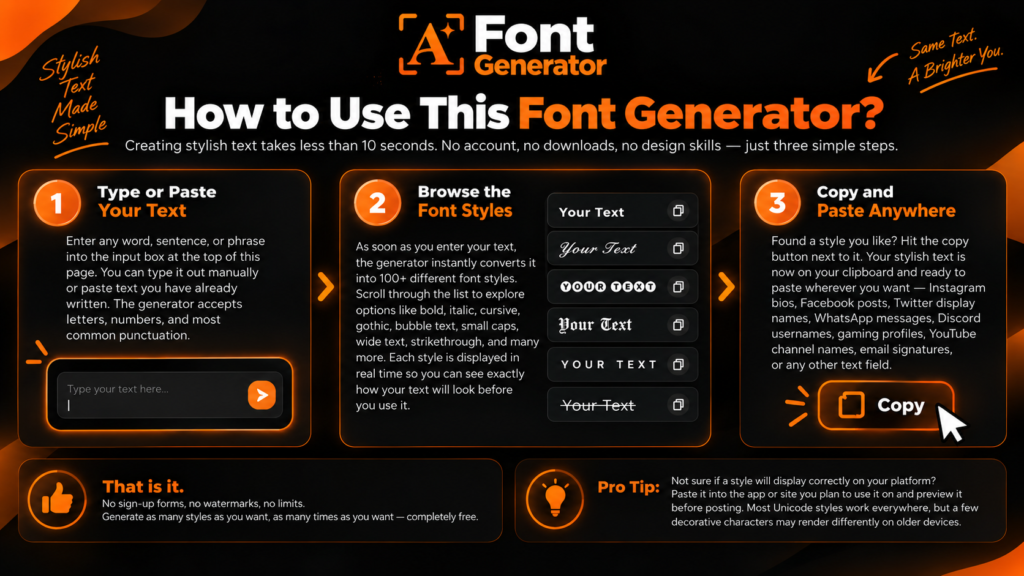
How to Use This Font Generator?
Creating stylish text takes less than 10 seconds. No account, no downloads, no design skills — just three simple steps.
Step 1 — Type or Paste Your Text:
Enter any word, sentence, or phrase into the input box at the top of this page. You can type it out manually or paste text you have already written. The generator accepts letters, numbers, and most common punctuation.
Step 2 — Browse the Font Styles:
As soon as you enter your text, the generator instantly converts it into 100+ different font styles. Scroll through the list to explore options like bold, italic, cursive, gothic, bubble text, small caps, wide text, strikethrough, and many more. Each style is displayed in real time so you can see exactly how your text will look before you use it.
Step 3 — Copy and Paste Anywhere:
Found a style you like? Hit the copy button next to it. Your stylish text is now on your clipboard and ready to paste wherever you want — Instagram bios, Facebook posts, Twitter display names, WhatsApp messages, Discord usernames, gaming profiles, YouTube channel names, email signatures, or any other text field.
That is it. No sign-up forms, no watermarks, no limits. Generate as many styles as you want, as many times as you want — completely free.
Pro Tip: Not sure if a style will display correctly on your platform? Paste it into the app or site you plan to use it on and preview it before posting. Most Unicode styles work everywhere, but a few decorative characters may render differently on older devices.
Popular Font Styles You Can Generate
This font generator gives you access to a wide library of text styles — all powered by Unicode. Whether you want something elegant, edgy, playful, or minimal, there is a style here for every mood and platform. Below are some of the most popular categories users love.
Bold Text
Makes your words heavier and more attention-grabbing. Perfect for headlines in social media posts or highlighting key points in a bio.
Example: 𝗧𝗵𝗶𝘀 𝗶𝘀 𝗯𝗼𝗹𝗱 𝘁𝗲𝘅𝘁
Italic Text
Adds a subtle slant that feels expressive and personal. Works great in Instagram captions and quotes.
Example: 𝘛𝘩𝘪𝘴 𝘪𝘴 𝘪𝘵𝘢𝘭𝘪𝘤 𝘵𝘦𝘹𝘵
Bold Italic Text
The best of both worlds — strong and expressive at the same time. Great for making a statement that demands attention.
Example: 𝙏𝙝𝙞𝙨 𝙞𝙨 𝙗𝙤𝙡𝙙 𝙞𝙩𝙖𝙡𝙞𝙘
Cursive / Script Text
Flowing, handwritten-style lettering that adds elegance and personality. A top choice for Instagram bios, wedding-related content, and aesthetic profiles.
Example: 𝒯𝒽𝒾𝓈 𝒾𝓈 𝒸𝓊𝓇𝓈𝒾𝓋ℯ 𝓉ℯ𝓍𝓉 Explore our cursive text guide to compare script styles.
Gothic / Old English Text
Dark, medieval-style characters that give your text a dramatic, vintage feel. Popular with gamers, musicians, and streetwear-inspired profiles.
Example: 𝔗𝔥𝔦𝔰 𝔦𝔰 𝔤𝔬𝔱𝔥𝔦𝔠 𝔱𝔢𝔵𝔱 See the gothic and Old English text guide for examples and uses.
Bubble Text
Each letter is enclosed in a circle, creating a rounded, playful look. Great for lighthearted bios and fun usernames.
Example: Ⓣⓗⓘⓢ ⓘⓢ ⓑⓤⓑⓑⓛⓔ ⓣⓔⓧⓣ
Squared Text
Letters boxed inside squares for a clean, blocky appearance. Works well for structured aesthetics and gaming tags.
Example: 🆃🅷🅸🆂 🅸🆂 🆂🆀🆄🅰🆁🅴🅳
Small Caps Text
Uppercase-style letters at lowercase size. Gives a refined, typographic feel without screaming in all caps.
Example: ᴛʜɪꜱ ɪꜱ ꜱᴍᴀʟʟ ᴄᴀᴘꜱ
Superscript Text
Tiny raised characters that sit above the normal text line. Used for mathematical notation, footnotes, or just a unique stylistic choice.
Example: ᵀʰⁱˢ ⁱˢ ˢᵘᵖᵉʳˢᶜʳⁱᵖᵗ
Wide / Fullwidth Text
Each character is spaced out to full width, creating a stretched, aesthetic vibe. A staple of the vaporwave and aesthetic text trend.
Example: This is wide text
Strikethrough Text
A horizontal line through each letter, commonly used to show deleted text, corrections, or sarcasm in social media posts and comments.
Example: T̶h̶i̶s̶ ̶i̶s̶ ̶s̶t̶r̶i̶k̶e̶t̶h̶r̶o̶u̶g̶h̶
Underline Text
Adds a line beneath every character. Useful for emphasizing words or mimicking hyperlink styling in plain text fields.
Example: T͟h͟i͟s͟ ͟i͟s͟ ͟u͟n͟d͟e͟r͟l͟i͟n͟e͟d͟
Zalgo / Glitch Text
Chaotic, distorted text with stacked diacritical marks that spill above and below the line. Ideal for creepy aesthetics, horror-themed content, and meme culture.
Example: T̷̢͝h̸̰̊i̶͖̅s̵͇̈ ̶̣̌i̷͙͑s̴̰̆ ̷̞̏Z̵̤͝a̵̙̔l̸͓̂g̷̱͝o̶͎̓
Emoji Decorated Text
Regular text wrapped with emoji symbols, borders, or decorative characters. Adds flair and visual interest, especially in bios and display names.
Example: ✦ T h i s ✦ i s ✦ d e c o r a t e d ✦
Monospace Text
Fixed-width characters where every letter takes up equal horizontal space, mimicking the look of a typewriter or code editor.
Example: 𝚃𝚑𝚒𝚜 𝚒𝚜 𝚖𝚘𝚗𝚘𝚜𝚙𝚊𝚌𝚎
Every style listed above is available right now in the generator at the top of this page. Just type your text once and see all of them generated instantly — no need to search for each style separately.
Where Can You Use These Fonts?
The stylish text you create with this font generator works anywhere that accepts standard text input. Since these are Unicode characters and not actual font files, you do not need to install anything — just copy, paste, and you are done. Here are the most popular platforms where people use fancy fonts every day.
Instagram is the number one reason people search for a font generator. The platform does not offer any built-in text styling for bios, captions, or comments. That means a stylish font is one of the fastest ways to make your profile stand out in a crowded feed. Use cursive text for an elegant bio, bold text to emphasize your niche, or decorated text to add personality to your display name.
Where it works: Bio, display name, captions, comments, story text (paste into text field)
Facebook supports Unicode characters in most text fields, making it easy to add flair to your posts, profile name, bio section, and comments. Bold and italic styles tend to perform well here because they break the visual monotony of a standard Facebook feed, which naturally draws more attention and engagement to your content.
Where it works: Posts, profile name, bio, comments, Messenger
Twitter / X
Your display name and bio on Twitter are prime real estate for fancy fonts. Since tweets themselves are short and text-heavy, even a subtle style change in your profile name can set you apart. Gothic, bold, and small caps are popular choices among creators and personal brands on the platform.
Where it works: Display name, bio, tweets, replies
WhatsApp has limited built-in formatting. A font generator fills that gap by letting you send messages in styles that WhatsApp does not natively support. Cursive, bold, and decorated text can make your messages feel more personal, expressive, or fun — especially in group chats.
Where it works: Messages, group chat names, status updates
Discord
The Discord community loves stylish usernames. Whether you are running a server, roleplaying, or just want a unique identity, fancy fonts help your name pop in member lists and chat threads. Gothic, zalgo, and bubble text are especially popular in gaming and aesthetic-themed servers.
Where it works: Username, server nicknames, channel descriptions, messages
TikTok
Your TikTok bio is short and needs to make an instant impression. A stylish font can communicate your vibe before anyone watches a single video. Cursive and decorated styles are widely used by creators to give their profiles a polished, branded look.
Where it works: Bio, display name
YouTube
YouTube allows Unicode characters in channel names, video descriptions, and comments. A styled channel name helps with brand recognition, while fancy text in descriptions and comments can draw attention to links, timestamps, or calls to action.
Where it works: Channel name, video descriptions, comments, community posts
Snapchat
Snapchat supports Unicode in display names, giving you the ability to add personality before someone even opens your snap. Simple styles like bold, italic, or small caps tend to work best here since the display name field is short.
Where it works: Display name
Telegram
Telegram supports a wide range of Unicode characters in chat messages, group names, and bios. Styled text adds character to your Telegram presence, especially if you run a public channel or large group where standing out matters.
Where it works: Messages, bio, group names, channel descriptions
Gaming — PUBG, Free Fire, Fortnite & More
Fancy fonts are massive in the gaming world. Players use them to create stylish, one-of-a-kind usernames that look intimidating, cool, or memorable in lobbies and leaderboards. Gothic, zalgo, and symbol-decorated names are the most popular styles across PUBG Mobile, Free Fire, Fortnite, Call of Duty Mobile, and Valorant.
Where it works: In-game display name, clan tags, profile bios
LinkedIn is a professional platform, so heavy decoration is not recommended here. However, subtle styles like bold or italic Unicode text can help your headline or summary section stand out in search results and profile views — as long as you keep it tasteful and readable.
Where it works: Headline, summary, posts (use sparingly)
Pinterest allows Unicode in pin descriptions, board names, and your profile bio. Styled text can help your pins catch more attention in search results and feeds, especially in visually competitive niches like fashion, design, and home decor.
Where it works: Pin descriptions, board titles, profile bio
No matter which platform you are using, the process is always the same — generate your text at the top of this page, hit copy, and paste it wherever you want. If a platform does not support a specific Unicode character, it will usually show a small square or blank space. In that case, simply try a different style.
Font Generator vs. Regular Fonts — What’s the Difference?
If you have ever searched for fonts online, you have probably come across two very different things — font generators like this one and traditional font files you download and install. They might seem similar on the surface, but they work in completely different ways and serve completely different purposes. Understanding the difference helps you pick the right tool for the right job.
What Are Regular Fonts?
Regular fonts are typeface files — usually in formats like TTF, OTF, or WOFF — that you download and install on your computer or upload to a website. Once installed, they become available in design software like Photoshop, Canva, or Figma and in word processors like Microsoft Word or Google Docs. Web developers also load them into websites using CSS so that the site’s text renders in a specific typeface.
Regular fonts give you full creative control. You can adjust size, weight, spacing, color, and every other typographic detail. But they come with a limitation — they only work inside the software or website where they are installed. You cannot paste a regular font into an Instagram bio or a WhatsApp message and expect it to look the same on someone else’s device.
What Does a Font Generator Do Differently?
A font generator does not create font files. Instead, it converts your text into special Unicode characters that visually resemble different font styles. These characters are part of the universal Unicode standard, which means they are recognized by virtually every modern device, browser, and app without installing anything.
When you copy text from this generator and paste it into a social media bio, a chat message, or a gaming username, it carries its style with it. The person reading it does not need any special font installed — they see the styled text exactly as you intended, because the characters themselves are the style.
Quick Comparison
Here is a side-by-side look at how the two approaches differ:
- Installation — Regular fonts require downloading and installing on your device. A font generator needs nothing — it works instantly in your browser.
- Where they work — Regular fonts work inside design software, word processors, and websites where they are loaded. Generated Unicode text works in any text field on any platform — social media, messaging apps, games, and more.
- Customization — Regular fonts offer deep control over size, color, weight, and spacing. Unicode text carries a fixed style — what you see is what you get.
- Use case — Regular fonts are built for graphic design, print, web design, and branding. A font generator is built for quick, everyday text styling on social media, chats, and profiles.
- Cost — Many premium regular fonts cost money, sometimes hundreds of dollars for a full family. Font generators like this one are completely free.
- Portability — Regular fonts stay on the device or server where they are installed. Unicode text travels with your message and displays the same way everywhere.
So Which One Should You Use?
It depends on what you are trying to do. If you are designing a logo, building a website, or creating print materials, you need regular fonts with full typographic control. But if you want to make your Instagram bio look unique, create a stylish gaming name, or add personality to a text message — a font generator is the faster, easier, and free solution.
Most people searching for a “font generator” are looking for exactly what this tool does — instant copy-and-paste text styling that works everywhere without downloads or design skills.
Benefits of Using a Font Generator
You already know what a font generator does and how it works. But why should you use one in the first place? Whether you are a social media creator, a gamer, a student, or someone who just wants their text to look a little more interesting, here is what makes a font generator one of the most practical tools on the internet.
Stand Out on Social Media
Social media platforms give everyone the same default font. That means every bio, every caption, and every comment looks identical at first glance. A font generator breaks that pattern instantly. When someone scrolls through a list of profiles or scans a comment section, stylish text catches the eye before anything else. It is one of the simplest ways to grab attention without spending hours on graphic design or paying for editing tools.
Completely Free to Use
Premium design software costs money. Custom fonts cost money. Hiring a designer costs money. This font generator costs nothing. You can generate unlimited styles, copy them as many times as you want, and use them wherever you want — all without spending a single rupee. There are no hidden fees, no freemium walls, and no paid tiers locking away the best styles.
No Downloads or Installation Required
Everything runs in your browser. You do not need to download an app, install a font pack, or sign up for an account. Open the page, type your text, copy the result. It works on your phone, your tablet, your laptop, and your desktop — any device with a browser and an internet connection.
Works on Every Platform
Because the generated text is made of Unicode characters — not proprietary font files — it works virtually everywhere. Instagram, Facebook, Twitter, WhatsApp, Discord, TikTok, YouTube, Telegram, Snapchat, PUBG, Free Fire, LinkedIn, Pinterest, email signatures, forum posts, dating app bios — if a platform accepts text input, it almost certainly supports the styles you create here.
Instant Results with Zero Learning Curve
There is nothing to learn and nothing to configure. You do not need to understand typography, design principles, or software tools. Type your text, see every available style generated in real time, tap copy, and paste. The entire process takes seconds, which makes it accessible to anyone regardless of age or technical skill level.
Express Your Personality
Plain text is functional but flat. Stylish text adds tone and personality to your words before anyone even reads them. A cursive bio feels elegant. A gothic username feels edgy. Bubble text feels playful. The font style you choose becomes part of your personal brand — a visual first impression that communicates who you are or what your page is about without saying a single extra word.
Boost Engagement and Visibility
Stylized text does not just look different — it performs differently. A uniquely styled display name in a comment section draws more profile visits. A bold or decorated Instagram bio holds attention longer and increases the chance of a follow. In gaming lobbies, a creative username gets remembered. Small visual differences create real advantages when you are competing for attention in crowded digital spaces.
Use It for Professional and Creative Projects
Font generators are not just for casual social media use. Content creators use styled text in thumbnails and video titles. Marketers use it to make social ad copy pop. Students use it to add flair to digital presentations. Small business owners use it to style their brand name across platforms without hiring a designer. The use cases go far beyond fun — they extend into real productivity and branding.
Tips for Using Fancy Fonts Effectively
Fancy fonts can make your text stand out — but only if you use them the right way. Using too many styles, choosing the wrong one for the context, or ignoring readability can actually hurt your presence instead of helping it. These practical tips will help you get the most out of your styled text without making common mistakes.
Keep Readability as Your Top Priority
A font style is only useful if people can actually read it. Styles like zalgo and heavily decorated text look dramatic, but they can be difficult to read in longer sentences. Use highly stylized fonts for short text — display names, headings, a single line in your bio — and keep longer text in simpler styles like bold, italic, or small caps. If someone has to squint or re-read your text to understand it, you have gone too far.
Match the Style to the Platform
Every platform has its own culture and audience expectations. Cursive and decorated text feel right at home on Instagram. Gothic and zalgo text fit perfectly in Discord servers and gaming profiles. But those same styles would feel out of place in a LinkedIn headline or a professional email signature. Before you paste, ask yourself whether the style matches the tone of the platform and the impression you want to make.
Use Fancy Fonts Sparingly — Not Everywhere
The power of stylish text comes from contrast. If everything on your profile is in a fancy font, nothing stands out. The most effective approach is to style one or two key elements — your display name, a headline in your bio, or a call to action — and leave the rest in plain text. That contrast is what draws the eye. When everything is decorated, the decoration becomes noise.
Test Before You Post
Not every Unicode character displays the same way on every device and operating system. A style that looks perfect on your Android phone might show blank squares on an older iPhone, or render slightly differently on a Windows desktop. Always paste your styled text into the actual platform and preview it before publishing. If a style breaks on a specific platform, switch to a different one — there are plenty of options to choose from.
Combine Fancy Fonts with Emojis Strategically
Emojis and stylish text are a powerful combination when used together with intention. A well-placed emoji before or after a styled line adds visual rhythm and breaks up text in a way that feels polished. But stacking five emojis next to zalgo text creates visual chaos. The rule of thumb is simple — if the combination looks clean when you step back and glance at it quickly, it works. If it takes effort to process, simplify it.
Avoid Using Fancy Fonts for Critical Information
If your text contains something important — a phone number, an email address, a website URL, or instructions someone needs to follow — keep it in plain text. Some Unicode characters are not searchable, not clickable, and not readable by screen readers or assistive technology. Anything functional should stay in standard characters so it works reliably for every user, including those with accessibility needs.
Do Not Use Styled Text to Bypass Platform Rules
Some users try to use Unicode fonts to get around content filters, banned word lists, or platform guidelines. This is a bad idea. Most major platforms have updated their detection systems to recognize Unicode variations of flagged words. Using styled text to evade moderation can result in your content being removed or your account being suspended. Use fancy fonts for creativity, not for workarounds.
Refresh Your Style Periodically
If you use the same font style in your bio or username for months, it becomes invisible to your regular audience. Changing your styled text every few weeks keeps your profile feeling fresh and gives returning visitors a reason to notice your name again. This is especially useful on platforms like Instagram, TikTok, and Discord where visual identity plays a big role in engagement and follower retention.
Think About Accessibility
Not everyone experiences text the same way. Screen readers — the tools used by visually impaired users to navigate the internet — often cannot interpret Unicode characters correctly. A word styled in cursive Unicode might be read aloud as a string of unrelated character names, which makes your content meaningless to that listener. If accessibility matters to your audience or brand, use styled text only for decorative elements and never for your primary message. Your content should still make complete sense in plain text. For broader writing guidance, see W3C’s tips for accessible content.
Frequently Asked Questions
What is a font generator?
A font generator is a free online tool that converts your normal text into stylish, decorative text using Unicode characters. You type or paste regular text, the generator transforms it into different visual styles, and you copy the result to use anywhere — social media bios, posts, messages, usernames, and more. No downloads or installations are needed. Everything happens instantly in your browser.
Is this font generator free to use?
Yes, completely free. There are no paid plans, no premium styles locked behind a paywall, and no limits on how many times you can generate or copy text. Every style on this page is available to every user at all times without creating an account or signing up for anything.
How does a font generator work?
It works by mapping each letter you type to a visually different character from the Unicode standard. Unicode contains thousands of character sets beyond the basic alphabet — including sets that look like bold, italic, cursive, gothic, bubble, and many other styles. The generator swaps your regular letters with their Unicode counterparts so the result looks like a different font but is technically still plain text that you can copy and paste anywhere.
Do these fonts work on iPhone and Android?
Yes. Since the generated text is made of Unicode characters, it works on both iPhone and Android devices. You can copy styled text from this generator and paste it into any app on your phone — Instagram, WhatsApp, Facebook, TikTok, Discord, gaming apps, and more. In rare cases, a few highly decorative characters may display differently depending on your operating system version, but the vast majority of styles work perfectly on all modern smartphones.
Are these real fonts?
Not in the traditional sense. Traditional fonts are typeface files like TTF or OTF that you install on a device or load into design software. The text generated here is made of special Unicode characters that visually resemble different font styles. The practical difference is that Unicode text can be copied and pasted into any text field on any platform, while traditional fonts only work inside the software where they are installed.
Can I use these fonts on Instagram?
Absolutely. Instagram is one of the most popular platforms for using generated fonts. You can paste styled text into your Instagram bio, display name, captions, comments, and even story text fields. Cursive, bold, italic, and decorated styles are the most popular choices for Instagram profiles.
Can I use these fonts for gaming usernames?
Yes. Gamers are one of the biggest user groups of font generators. You can create stylish usernames for PUBG Mobile, Free Fire, Fortnite, Call of Duty Mobile, Valorant, and most other games that allow custom display names. Gothic, zalgo, and symbol-decorated styles are especially popular for gaming because they make your name stand out in lobbies and leaderboards. Just make sure the game you are playing accepts Unicode characters in its name field — most modern games do.
Why do some fonts not display correctly on certain devices?
This happens because different operating systems and apps support different portions of the Unicode standard. A character that renders perfectly on Android might show as a blank square or a generic placeholder on an older version of iOS, or vice versa. This is not a problem with the generator itself — it is a limitation of the device or app trying to display the character. If a style does not render correctly for you, simply try a different one. Simpler styles like bold, italic, and small caps have the widest compatibility across all devices.
Is it safe to use fancy fonts on social media?
yes, using Unicode-styled text on social media is completely safe. It does not violate any platform’s terms of service, it does not affect your account security, and it does not require you to grant permissions to any third-party app. You are simply pasting text characters — the same kind of characters you use every day. The only thing to avoid is using styled text to deliberately bypass content moderation filters, which could result in your content being flagged or removed.
Can screen readers read these fonts?
In most cases, no. Screen readers — the assistive tools used by visually impaired people — often cannot correctly interpret Unicode characters that fall outside the standard Latin alphabet. A word written in cursive Unicode might be read aloud as a series of unrelated character names rather than the intended word. If accessibility is important to your audience or content, use styled text only for decorative elements like your display name and keep all meaningful content in plain text.
Do these fonts work in emails?
It depends on the email client. Most modern email platforms like Gmail, Outlook, and Yahoo Mail will display Unicode characters correctly in the subject line and body text. However, some corporate email systems and older clients may not render all styles properly. Bold and italic Unicode text tend to have the highest compatibility across email platforms. If you are sending a professional email, test the styled text by sending yourself a preview first.
Can I use a font generator for my business or brand name?
Yes, many small businesses and personal brands use font generators to style their names on social media profiles, bios, and posts. It is a quick and free way to add visual identity to your brand without hiring a designer. Just keep in mind that Unicode-styled text is not searchable the same way plain text is — so if someone types your brand name in a search bar, the styled version may not appear in results. Use styled text for display purposes and always include your brand name in plain text somewhere on your profile as well.
How many font styles are available on this generator?
This generator offers over 100 different font styles including bold, italic, cursive, gothic, bubble, squared, small caps, superscript, wide text, strikethrough, underline, zalgo, monospace, and many decorated and symbol-enhanced variations. New styles are added periodically, so the collection continues to grow.
Do I need to create an account to use this tool?
No. There is no sign-up, no login, and no account required. Just open the page, type your text, and start copying styles. Your text is not stored, saved, or shared anywhere — it is processed entirely in your browser.
Can I generate fonts in languages other than English?
The generator works best with the English alphabet because most Unicode style sets are based on Latin characters. Some styles may partially support other Latin-based languages like Spanish, French, or German, but accented characters might not convert correctly in every style. For non-Latin scripts like Arabic, Hindi, Chinese, Japanese, or Korean, most decorative Unicode styles will not apply because equivalent character sets do not exist in Unicode for those scripts. You can still use symbol decorations and emoji-based styles around non-Latin text.
Related Tools You Might Like
Looking for more ways to style, format, or enhance your text? We have built a collection of free tools designed to work alongside this font generator. Each one solves a specific text styling problem — no downloads, no sign-ups, just instant results.
Bold Text Generator
Generate bold Unicode text you can copy and paste into social media bios, posts, and messages. Perfect when you want emphasis without using a full fancy font style.
Italic Text Generator
Convert your text into italic Unicode characters instantly. Great for adding a subtle, expressive touch to captions, quotes, and display names.
Cursive Text Generator
Create elegant, handwritten-style text using Unicode script characters. One of the most popular styles for Instagram bios and aesthetic profiles.
Gothic Text Generator
Transform your text into dark, medieval-style Old English characters. A favorite among gamers, musicians, and anyone going for a dramatic, edgy aesthetic.
Zalgo Text Generator
Generate creepy, glitched-out text with stacked diacritical marks. Ideal for horror-themed content, memes, and standing out in Discord servers.
Bubble Text Generator
Turn your letters into circled characters for a rounded, playful look. Works well for lighthearted bios, fun usernames, and casual social media posts.
Small Caps Generator
Convert lowercase text into small capital letters for a refined, typographic appearance. A popular choice for professional-looking bios that still feel styled.
Strikethrough Text Generator
Add a horizontal line through your text. Commonly used for showing corrections, sarcasm, humor, or deleted thoughts in social media posts and comments.
Underline Text Generator
Add a line beneath every character in your text. Useful for emphasizing important words or phrases in plain text fields that do not support native formatting.
Wide Text Generator
Stretch your characters to fullwidth spacing for that aesthetic, vaporwave-inspired look. Popular on Twitter, Discord, and meme-oriented platforms.
Invisible Character Generator
Generate blank Unicode characters you can copy and paste to create empty messages, blank usernames, or spacing tricks on platforms that do not allow regular spaces.
Text Repeater
Repeat any word, phrase, or emoji hundreds or thousands of times with a single click. Useful for filling text fields, creating visual patterns, or just having fun in group chats.
Emoji Combiner
Mix and match emojis with styled text to create decorated display names, bios, and headers. Combine your favorite symbols with fancy fonts for maximum visual impact.
Upside Down Text Generator
Flip your text completely upside down using special Unicode characters. A fun, attention-grabbing trick for social media posts, bios, and messages.
Mirror Text Generator
Reverse your text so it reads backwards like a mirror reflection. Great for puzzles, creative posts, and unique display names.
Each tool listed above is completely free and works the same way — type your text, see the result, copy and paste. No accounts, no downloads, no limits.
About This Tool
This font generator was built with one goal — to give you the fastest, easiest way to create stylish text without downloading anything, signing up for anything, or paying for anything. It started as a simple project to solve a common problem: social media platforms, messaging apps, and games do not let you change your font. But millions of people want their text to look different, and they should not need design software or technical skills to make that happen.
Every style on this page is generated using the Unicode standard — a universal text encoding system supported by virtually every modern device, browser, and app on the planet. That means the text you create here is not an image and not a font file. It is real, copyable, pasteable text that works wherever you put it.
We are constantly updating this tool with new styles, better compatibility, and faster performance. If you have a suggestion, found a bug, or want to see a specific style added, feel free to reach out through our contact page. This tool is built for you, and your feedback makes it better. You can also read about FontGenerator.pk and review our Privacy Policy.
Whether you are styling your Instagram bio, creating a gaming username, adding flair to a WhatsApp message, or just having fun with text — we are glad you are here. Bookmark this page and come back anytime you need a fresh look for your words.